Whether you manage 2 sites or 200, CaptiFi gives you one login, one guest database and one view of performance across every location. Switch venue with a picker, compare locations side by side, and let each site keep its own splash design, timezone and offers.
40-60%
Average Email Opt-In Rate
Under 2 hours
Average Support Reply
11+
Integrations Included
99.9%
Platform Uptime
Multi-location businesses struggle with inconsistent guest WiFi experiences, fragmented data, and no way to compare performance across sites. Beambox's multi-location comparison interface is clunky according to G2 reviewers.
CaptiFi's multi-venue dashboard lets you manage all locations from one place. Apply global splash page templates, compare cross-location metrics, and drill down into individual site performance.
One login and one guest database across every location, with a venue picker on every page
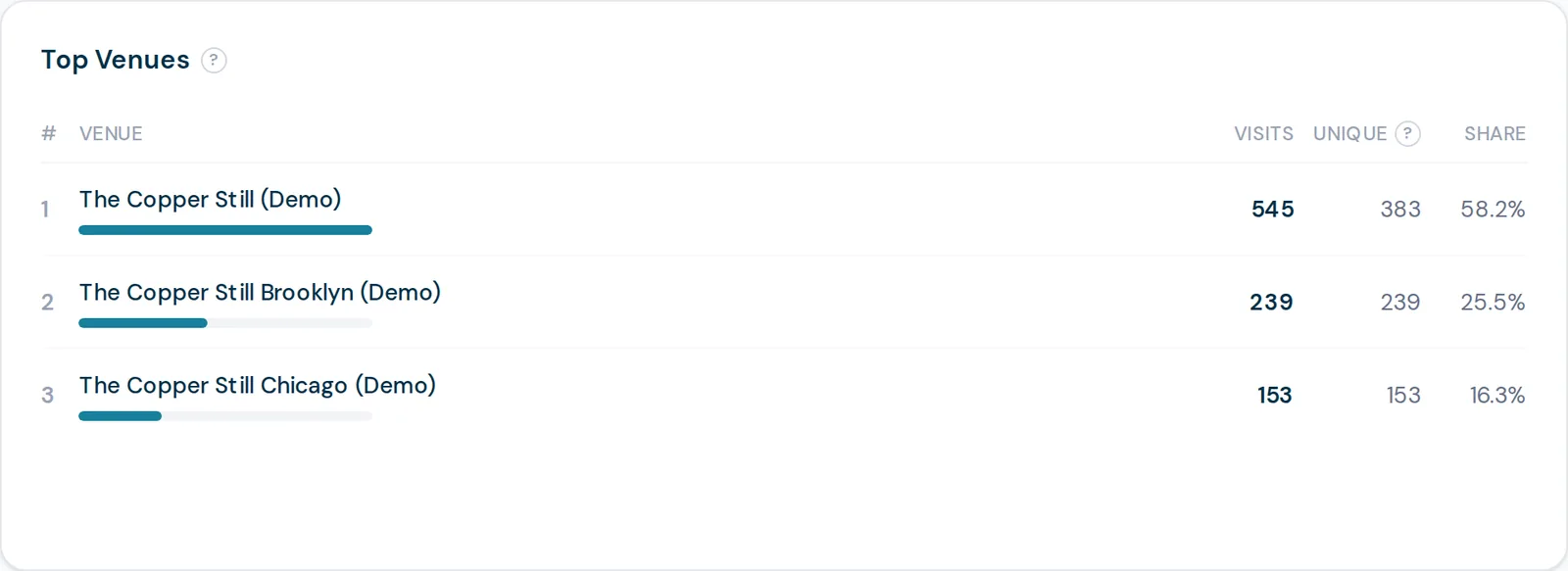
Compare locations side by side in the Top Venues ranking, or view them all at once
Copy a splash design from one venue to another instead of rebuilding it
Each venue keeps its own timezone, so busiest-hour and footfall read in local time
Per-location offers, branding and WiFi settings when they need to differ
No cap on locations: one is included on every plan, extras are a flat monthly fee
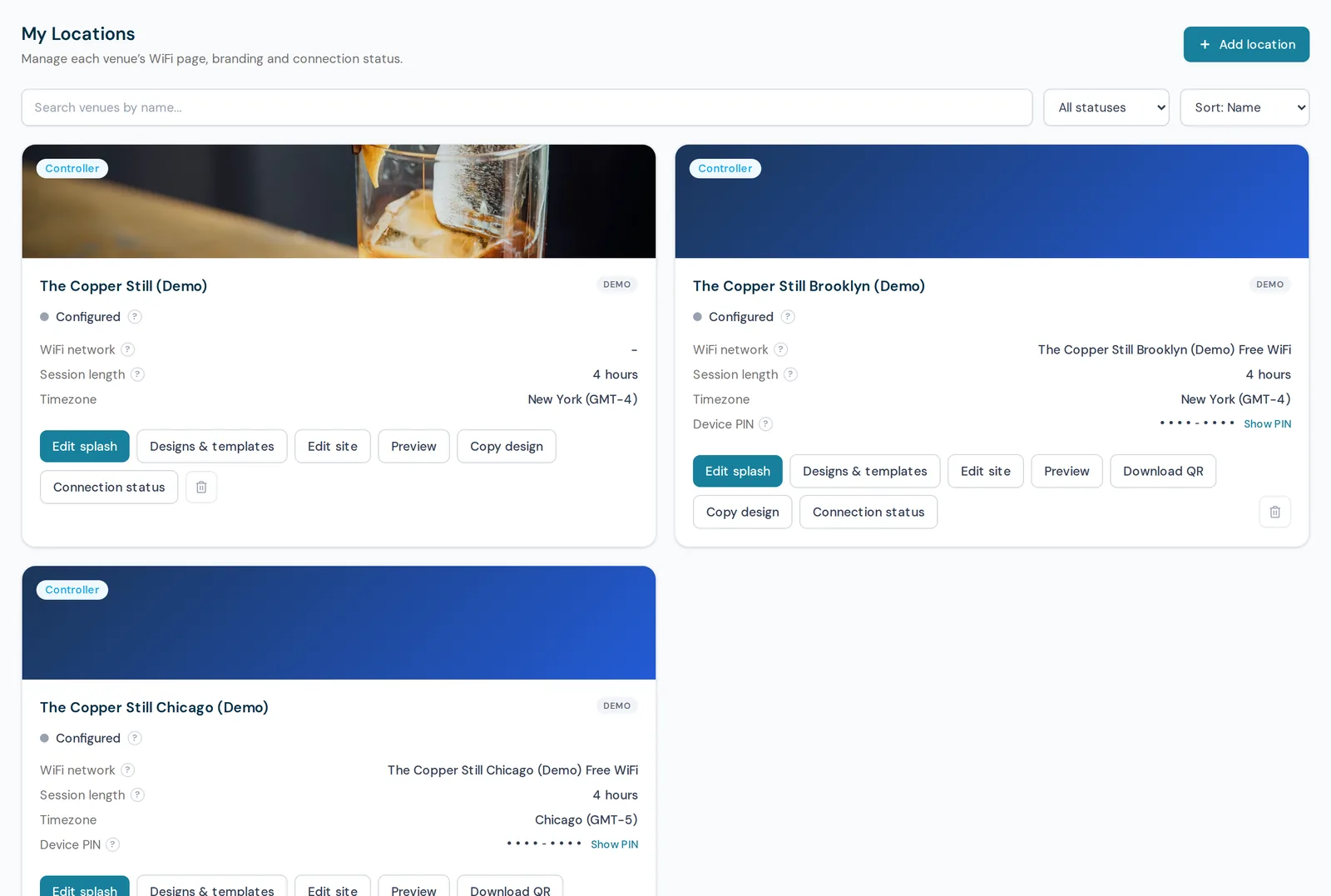
Each venue is a card carrying the things you actually need to check: its WiFi network name, session length, its own timezone, and whether it is configured and online. From here you edit that venue's splash page, preview exactly what its guests see, or copy a design straight across from another site. Adding the fourth venue works the same way as the second.
Top Venues ranks your sites against each other for whatever date range you are looking at, so the question "which of these is actually working" has an answer on screen rather than in a spreadsheet. Every other report on the analytics page can be read either across all venues at once or for one venue at a time, using the picker in the top bar.
Multi-venue management means running the guest WiFi for several locations from one login: one guest database, one set of campaigns, one place to compare how each site is doing, while each site keeps the parts that genuinely differ. In CaptiFi every page carries a venue picker, so you move between one site and all of them without logging out or switching accounts, and a guest who visits two of your locations stays one person with two visits rather than becoming two contacts.
There is no cap. One location is included on every plan and each additional location is a flat monthly fee, charged in your own currency. Adding a venue reconciles your subscription immediately, and so does removing one, so you are never paying for a site you have closed. The guest records a removed site captured stay in your database, because taking hardware out of a building should not delete the marketing list it built.
No. Build a design once and copy it to another venue, then change only what differs: the venue name, the offer, the background. Copies are deliberately independent rather than linked to a master template, which is the safer behaviour for a group: a seasonal change at one site can never silently rewrite the splash page at another.
Yes. Access is granted per venue, and it is separate from who pays for the site, so a manager can be given their own location while head office keeps the group view, and moving a venue between managers never touches your subscription. Everything they see, from the guest list to analytics to the AI assistant, is filtered to the venues they can access.
CaptiFi is a guest WiFi marketing platform for venues, restaurants, hotels, cafés, retail spaces and short-term rentals. It turns branded WiFi logins into first-party customer data, automated Google review requests, repeat visitor insights and email marketing lists.
One location is included on every plan. Add each additional venue from My Locations and your subscription is reconciled straight away, so you only ever pay for the sites you have.
Pick the venue's local timezone when you create it. Busiest hour, the footfall heatmap and the peak occupancy moment then read in local time, which matters as soon as you cross a timezone.
Design the first venue's splash page, then copy it to the others and change only what differs. Copies stay independent, so a change at one site never rewrites another.
Invite your team and grant access per venue. A site manager sees their location, head office sees the group, and access is separate from who pays for the site.
Use the venue picker on any page to switch between a single site and the whole account. On Pro and above, the Top Venues card ranks every location side by side.
Your guest database is shared with a venue column, so a campaign can target every location or just one. The recipient count and the cost are shown per venue before you send.
The question every group asks first. Marketing and billing are one thing; the building is not.
Add as many locations as you need. One is included and extras are a flat monthly fee each. Every venue gets its own splash page, hardware and guest capture, and the venue picker switches between them.
Compare venues side by side in the Top Venues ranking, and report on every location at once with the all-venues view. Below Pro the dashboard shows one venue at a time.
Per-location pricing is shown in your own currency on the pricing page.
CaptiFi completely changed my business. Before, every guest was a one-time booking. Now I have a direct line to thousands of people who've stayed in the plane. I can offer them return deals, send updates about new features, and keep them engaged. My repeat booking rate went from almost zero to 35%. It's been incredible.
Owner, PytchAir Boeing 727 Airbnb
Start your 30-day free trial today. Hardware included (refundable hold), no setup costs, cancel anytime.